Tuesday, 9 February 2016

Thousands of FBI and Homeland Security Details Stolen by Hackers

Homeland Security
The Hackers Accessed the Data Through a US Department of Justice Email Account.
Hackers have Breached the US Department of Homeland Security’s System and Leaked Personal Details of the People Who Work There. The Hacker group – which we have chosen not to name – posted a database online that contained 9,355 names, titles, locations, telephone numbers and email addresses of the US government employees. The details were posted to an encrypted text-sharing website called Cryptobin. The group has warned that it has a further database, containing the details of 20,000 Federal Bureau of Investigations (FBI) employees, that it will release soon. It also claims to have access to 200 GB of data from the Department of Justice.
The Hackers claim that the leaked database contains the information of “all Homeland Security employees.” In fact, the Department employs around 240,000 people. But the Telegraph can confirm that names on the list of 9,355 employees do correspond with people that work at the Department.
The employees listed include people in the communications team, security specialists, intelligence analysts, and many more. Some of the names are publicly available on databases online, including Linked In.
One of the Hackers that claims to be behind the breach is a British male, and a former member of the Lizard Squad – The Hacking Group that claimed Responsibility for the Sony PlayStation and Xbox Live outages in Christmas 2014.
Ahead of the Release, he told Motherboard how he accessed the data – through a simple spear phishing email attack. He first got access to an internal Department of Justice network through an email account and a quick phone call to a member of staff there.
He found the database on the intranet, along with 1TB of data. He managed to download the details of about 30,000 US government employees from the FBI and Homeland Security, as well as 200GB of data. The data includes more sensitive information like credit card numbers and military emails, he said.
It is likely that the list of Homeland Security employees is just the first release that will come from the group, which describes itself as pro-Palestine. The Homeland Security data was posted under the message: “This is for Palestine, Ramallah, West Bank, Gaza, this is for the child that is searching for an answer.”
The breach is the latest in a series of foreign policy-motivated attacks against US government employees. In October, a teenage hacker accessed the personal email account of John Brennan, the CIA director. They then posted online a list of email addresses apparently from his contacts list.
The same teen followed the hack with a prank that meant every call to James Clapper, the US Director of National Intelligence, was forwarded to the Free Palestine Movement.
WikiLeaks released a trove of documents from the hacked personal email of Brennan back in October.
Peter Carr, a spokesman for the Department of Justice, said it did not think the hackers had managed to release “sensitive, personally-identifiable information”, and that if it discovered criminal activity it would press charges.
“The department is looking into the unauthorized access of a system operated by one of its components containing employee contact information,” he told The Telegraph.
“This unauthorised access is still under investigation; however, there is no indication at this time that there is any breach of sensitive personally identifiable information.
“The department takes this very seriously and is continuing to deploy protection and defensive measures to safeguard information. Any activity that is determined to be criminal in nature will be referred to law enforcement for investigation.”
A spokesman from the Department of Homeland Security said it is “looking into the reports.”
“We take these reports very seriously, however there is no indication at this time that there is any breach of sensitive or personally identifiable information,” They Said.

(Source:- http://blog.toorpwn.com/thousands-of-fbi-and-homeland-security-details-stolen-by-hackers/)

Monday, 8 February 2016

Here Are The Best Linux Distros of 2016

Here are the top Linux distros of 2016

Linux was developed by Linus Torvalds at the University of Helsinki in Finland. It was inspired by Minix, a small Unix System and was introduced in October 1991.
The first official version was Linux 0.02. In 2001, 2.4 version was released. It is developed under GNU license, which allows the source code of Linux to be distributed freely. Linux is used for networking, software development and web hosting.
Ever since it was introduced, Linux has beengaining rapid popularity among users. However, choosing the right distro is very important given that there are dozens of them which can fulfill your needs.
Swapnil Bhartiya from Linux.com has prepared a exhaustive list of best Linux distros for 2016 which you can choose according to your needs.

Here are the best Linux distros of 2016

Best Comeback Distro: openSUSE

openSUSE formerly SUSE Linux and SuSE Linux Professional, is a Linux-based project and distribution sponsored by SUSE Linux GmbH and other companies. It is widely used throughout the world, particularly in Germany. The focus of its development is creating usable open-source tools for software developers and system administrators, while providing a user-friendly desktop, and feature-rich server environment.
The company actually predates Linux king Red Hat. SUSE is also the sponsor of the community-based distro openSUSE.
In 2015, openSUSE teams decided to come closer to SUSE Linux Enterprise (SLE) so that users could have a distribution that shares its DNA with the enterprise server — similar to CentOS and Ubuntu. Thus, openSUSE became openSUSE Leap, a distribution that’s directly based on SLE SP (service pack) 1.
Furthermore, openSUSE also announced the release of Tumbleweed, a pure rolling-release version. So, now, users can use either the super-stable openSUSE Leap or the always up-to-date openSUSE Tumbleweed.

Most Customizable Distro: Arch Linux

Arch Linux is a Linux distribution for computers based on IA-32 and x86-64 architectures. The design approach of the development team follows the KISS principle (“keep it simple, stupid”) as the general guideline, and focuses on elegance, code correctness, minimalism and simplicity, and expects the user to be willing to make some effort to understand the system’s operation. A package manager written specifically for Arch Linux, pacman, is used to install, remove and update software packages.
Arch Linux is the best rolling-release distribution for the following reasons.
  • Arch Linux is a great distro for those who want to learn everything about Linux. Because you have to install everything manually, you learn all the bits and pieces of a Linux-based operating system.
  • Arch is the most customizable distribution. There is no “Arch” flavor of any DE. All you get is a foundation and you can build whatever distro want, on top of it. For good or for worse, unlike openSUSE or Ubuntu there is no extra patching or integration. You get what upstream developers created. Period.
  • Arch Linux is also one of the best rolling releases. It’s always updated. Users always run the latest packages, and they can also run pre-released software through unstable repositories.
  • Arch is also known for having excellent documentation. Arch Wiki is best go-to resource for everything Linux related.
  • Arch offers almost every package and software that’s available for “any” Linux distribution, thanks to the Arch User Repository, aka AUR.

Best-Looking Distro: elementary OS

Elementary OS is a Linux distribution based on Ubuntu. It is the vehicle to introduce the Pantheon desktop environment, similar to how Linux Mint was the vehicle to introduce the Cinnamon desktop environment before Cinnamon was available in other Linux distributions.
elementary OS is quite strict about the holistic look and feel. The developers have created their own components, including the desktop environment. Additionally, they choose only those applications that fit into the design paradigm. One can find heavy influence of Mac OS X on elementary OS.

Best Newcomer: Solus

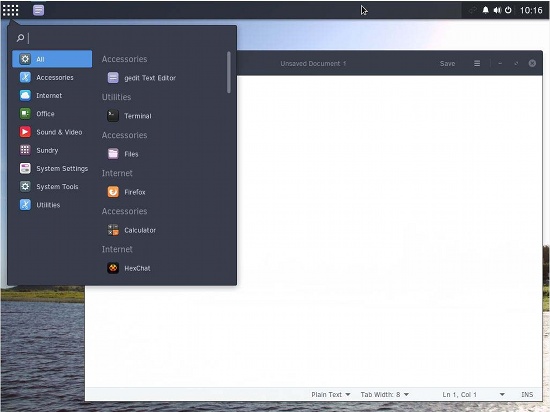
Solus is a decent-looking operating system that has been created from scratch. It’s not a derivative of Debian or Ubuntu. It comes with the Budgie desktop environment, which was built from scratch but aims to integrate with Gnome. Solus has the same minimalistic approach as Google’s Chrome OS.
distro-solus

Best Cloud OS: Chrome OS

Chrome OS is a browser-based operating system for online activities. However, because it’s based on Linux and its source code is available for anyone to compile.

Best Laptop OS: Ubuntu MATE

Ubuntu MATE is a free and open source Linux distribution and an official derivative of Ubuntu. Its main differentiation from Ubuntu is that it uses the MATE desktop environment as its default user interface, based on GNOME 2 which was used for Ubuntu versions prior to 11.04, instead of the Unity graphical shell that is the default user interface for the Ubuntu desktop.
Ubuntu MATE to be an excellent operating system if you are a Ubuntu lover.

Best Distro for Old Hardware: Lubuntu

If you have an old laptop or PC sitting around, breathe new life into it with Lubuntu. Lubuntu uses LXDE, but the project has merged with Razor Qt to create LXQt. Although the latest release 15.04 is still using LXDE, the future versions will be using LXQt. Lubuntu is a decent operating system for old hardware.

Best Distro for IoT: Snappy Ubuntu Core

Now a days Internet of Things (IoT) is everywhere and Snappy Ubuntu Core is the best Linux-based operating system for IoT connected devices. The operating system holds great potential to turn almost everything around us into smart devices — such as routers, coffeemakers, drones, etc. What makes it even more interesting is the way the software manages updates and offers containerization for added security.

Best Distro for Desktops: Linux Mint Cinnamon

Linux Mint Cinnamon is the best operating system for desktops and powerful laptops. I will go as far as calling it the Mac OS X of the Linux world. Honestly, I had not been a huge fan of Linux Mint for a long time because of unstable Cinnamon. But, as soon as the developers chose to use LTS as the base, the distro has become incredibly stable. Because the developers don’t have to spend much time worrying about keeping up with Ubuntu, they are now investing all of their time in making Cinnamon better.

Best Distro for Games: Steam OS

Gaming has been a weakness of desktop Linux. Many users dual-boot with Windows just to be able to play games. Valve Software, the games distributor is trying to bring as many games as possible on Linux. And, Valve has now created their open operating system — Steam OS — to create a Linux-based gaming platform.

Best Distro for Privacy: Tails

In this age of mass surveillance and tracking by marketers (anonymous tracking for targeted content is acceptable), privacy has become a major issue. If you are someone who needs to keep the government and marketing agencies out of your business, you need an operating system that’s created — from the ground up — with privacy in mind.
And, nothing beats Tails for this purpose. It’s a Debian-based distribution that offers privacy and anonymity by design. Tails is so good that, according to reports, the NSA considers it a major threat to their hacking activities.

Best Distro for Multimedia Production: Ubuntu Studio

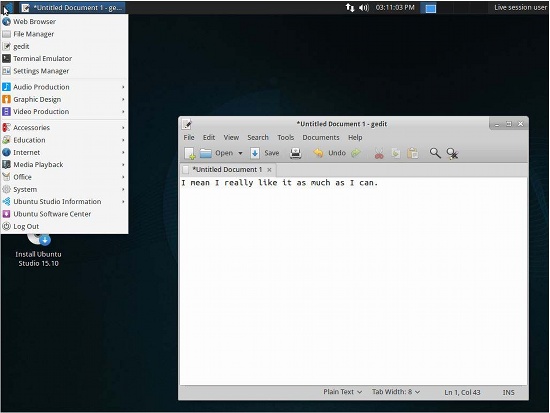
Ubuntu Studio is an officially recognized derivative of the Ubuntu Linux distribution, which is explicitly geared to general multimedia production. It should use a lightweight desktop environment so that precious system resources — such as CPU and RAM — are used sparingly by the system itself, leaving them for the multimedia applications. And, the best Linux distribution for multimedia production is Ubuntu Studio. It uses Xfce and comes with a broad range of audio, video, and image editing applications.
distro-ubuntu-studio

Best Enterprise Distro: SLE/RHEL

Enterprise customers don’t look for articles like these to choose a distribution to run on their servers. They already know where to go: It’s either Red Hat Enterprise Linux or SUSE Linux Enterprise. These two names have become synonymous with enterprise servers. These companies are also pushing boundaries by innovating in this changing landscape where everything is containerized and becoming software defined.

Best Server OS: Debian/CentOS

If you are looking at running a server, but you can’t afford or don’t want to pay a subscription fee for RHEL or SLE, then there is nothing better than Debian or CentOS. These distributions are the gold standard when it comes to community-based servers. And, they are supported for a very long time, so you won’t have to worry about upgrading your system so often.

Best Mobile OS: Plasma Mobile

Although the Linux-based distribution Android is ruling the roost, KDE’s Plasma Mobile is one the best alternative for a mobile operating system. This Kubuntu-based distribution was launched in 2015.

Best Distro for ARM Devices: Arch Linux ARM

Arch Linux ARM is a port of Arch Linux for ARM processors. Its design philosophy is “simplicity and full control to the end user,” and like its parent operating system Arch Linux, aims to be very Unix-like. This goal of minimalism and complete user control, however, can make Arch Linux difficult for Linux beginners as it requires more knowledge of and responsibility for the operating system.
Arch Linux ARM is a purely community-based distribution that’s based on Arch Linux. You can run it on Raspberry Pi, Chromebooks, Android devices, Nvidia Shield, and what not. What makes this distribution even more interesting is that, thanks to the Arch User Repository (AUR), you can install many applications than you may not get on other distributions.
These are the best distros which we could figure out. If you find any distro that is not mentioned here but, you think is a better alternative, kindly mention the same in the comments.

What’s Dark Web And How Does It Work

What a tangled web we weave, indeed. About 40 percent of the world’s population uses the Web for news, entertainment, communication and myriad other purposes [source: Internet World Stats]. Yet even as more and more people log on, they are actually finding less of the data that’s stored online. That’s because only a sliver of what we know as the World Wide Web is easily accessible.
The so-called surface Web, which all of us use routinely, consists of data that search engines can find and then offer up in response to your queries. But in the same way that only the tip of an iceberg is visible to observers, a traditional search engine sees only a small amount of the information that’s available — a measly 0.03 percent.

What’s Dark Web ?

deep-web-dark-web-nedir
The Dark Web is a term that refers specifically to a collection of websites that are publicly visible, but hide the IP addresses of the servers that run them. Thus they can be visited by any web user, but it is very difficult to work out who is behind the sites. And you cannot find these sites using search engines.
Almost all sites on the so-called Dark Web hide their identity using the Tor encryption tool. You may know Tor for its end-user-hiding properties. You can use Tor to hide your identity, and spoof your location. When a website is run through Tor it has much the same effect.
Indeed, it multiplies the effect. To visit a site on the Dark Web that is using Tor encryption, the web user needs to be using Tor. Just as the end user’s IP is bounced through several layers of encryption to appear to be at another IP address on the Tor network, so is that of the website. So there are several layers of magnitude more secrecy than the already secret act of using Tor to visit a website on the open internet – for both parties.
Not all Dark Web sites use Tor. Some use similar services such as I2P – indeed the all new Silk Road Reloaded uses this service. But the principle remains the same. The visitor has to use the same encryption tool as the site and – crucially – know where to find the site, in order to type in the URL and visit.
Infamous examples of Dark Web sites include the Silk Road and its offspring. The Silk Road was (and maybe still is) a website for the buying and selling of recreational drugs. But there are legitimate uses for the Dark Web. People operating within closed, totalitarian societies can use the Dark Web to communicate with the outside world. And given recent revelations about US- and UK government snooping on web use, you may feel it is sensible to take your communication on to the Dark Web. (I’ll stick to Facebook, but I like the attention.)

How Does It Work ?

Screenshot-from-2013-04-09-100000
it’s buried in what’s called the deep Web. The deep Web (also known as the undernet, invisible Web and hidden Web, among other monikers) consists of data that you won’t locate with a simple Google search.
No one really knows how big the deep Web really is, but it’s hundreds (or perhaps even thousands) of times bigger that the surface Web. This data isn’t necessarily hidden on purpose. It’s just hard for current search engine technology to find and make sense of it.
There’s a flip side of the deep Web that’s a lot murkier — and, sometimes, darker — which is why it’s also known as the dark Web. In the dark Web, users really do intentionally bury data. Often, these parts of the Web are accessible only if you use special browser software that helps to peel away the onion-like layers of the dark Web.
This software maintains the privacy of both the source and the destination of data and the people who access it. For political dissidents and criminals alike, this kind of anonymity shows the immense power of the dark Web, enabling transfers of information, goods and services, legally or illegally, to the chagrin of the powers-that-be all over the world.
Just as a search engine is simply scratching the surface of the Web, we’re only getting started. Keep reading to find out how tangled our Web really becomes.

How to access the Dark Web ?

20130426-tor
Technically, this is not a difficult process. You simply need to install and use Tor. Go to www.torproject.org and download the Tor Browser Bundle, which contains all the required tools. Run the downloaded file, choose an extraction location, then open the folder and click Start Tor Browser. That’s it. The Vidalia Control Panel will automatically handle the randomised network setup and, when Tor is ready, the browser will open; just close it again to disconnect from the network.
Depending on what you intend to do on the Dark Web, some users recommend placing tape over your laptop’s webcam to prevent prying eyes watching you. A tinfoil hat is also an option.
The difficult thing is knowing where to look. There, reader, we leave you to your own devices and wish you good luck and safe surfing. And a warning before you go any further. Once you get into the Dark Web, you *will* be able to access those sites to which the tabloids refer. This means that you could be a click away from sites selling drugs and guns, and – frankly – even worse things.
Aggregation sites such as Reddit offer lists of links, as do several Wikis, including http://thehiddenwiki.org/  – a list that offers access to some very bad places. Have a quick look by all means, but please don’t take our linking to it as an endorsement.
Also, Dark Web sites do go down from time to time, due to their dark nature. But if you want good customer service, stay out of the dark!
And do heed our warning: this article is intended as a guide to what is the Dark Web – not an endorsement or encouragement for you to start behaving in illegal or immoral behaviour.


(Source:- http://www.geekboy.co/geekboy/whats-dark-web-and-how-does-it-work/)

4 Things You Didn’t Know Could Be Hacked


At two big hacking conferences in Las Vegas over the summer, security pros revealed new vulnerabilities in daily items we never considered security risks. These events serve as annual displays of the latest hacking tricks.
At one of the conferences, called Black Hat, two researchers outlined how they hacked a Jeep from more than 10 miles away using a laptop. After Wired broke that story last month, Fiat Chrystler recalled 1.4 million vehicles due to hacking concerns.
1. Rifles
4 things you didn’t know could be hacked
© Provided by MarketWatch 4 things you didn’t know could be hacked
The Austin, Texas-based company TrackingPoint makes auto-aiming rifles that increase a shooter’s accuracy and have Wi-Fi connectivity. Within the 100- to 150-feet range of the Wi-Fi and using a mobile phone, a hacker can compromise the weapon and change the target of the shooter, says Runa Sandvik, one of the researchers who presented at the annual hacker gathering Def Con last week.
In a demonstration for Wired, Sandvik and a research partner finagled with a rifle’s software to shift aim 2.5 feet to the left, hitting a different target.
The company posted a notice on its website in response to the Wired article, saying that it is working with the researchers and will offer a software update if one is warranted. Until then, the note says, you can continue using the Wi-Fi intended for downloading photos, among other functionality, “if you are confident no hackers are within 100 feet.”
Sandvik says the Wi-Fi must be turned on to hack into the rifle and manipulate the target, and attackers cannot force the rifle to fire remotely, though they could unlock the trigger. Plus, she added, researchers have in the past found ways to boost Wi-Fi signals from other devices and stretch connectivity to longer distances.
“A successful attacker could cause the rifle to misbehave on every single shot without the shooter knowing how or why,” Sandvik told MarketWatch. “The short version here is that you cannot underestimate a motivated attacker.”
2. Electronic skateboards
A girl rides an electric skateboard in Brazil
© YASUYOSHI CHIBA/AFP/Getty Images A girl rides an electric skateboard in Brazil
Electric skateboards can make your ride smoother — until the board no longer listens to your controls and throws you off. Two researchers developed a hack they dubbed “FacePlant,” which gave them total control over digital skateboards by manipulating the Bluetooth connection.
An attacker could force the skateboard to connect to a laptop and then stop the board, alter its direction or disable its brakes. The hackers conducted their research with a $1,500 board made by Boosted, a Mountain View, Calif.-based company, and a $700 to $1,000 board from the Australian firm Revo and a $700 board by China’s Yuneec.
“It’s easy to point to this and say, oh it’s just a skateboard,” Richo Healey, a security engineer at the payments company Stripe, told Wired. “But for people who are buying these boards and commuting on them every day … there is risk obviously associated with that.”
3. Death records
Funeral casket
© Corbis Funeral casket
It’s pretty simple to kill someone off — at least on paper — Chris Rock, chief executive officer and founder of the security company Kustodian, showed in a presentation at Def Con. Using information found online, anyone can complete state electronic death records, Rock found, and then register to become a funeral director online to complete a certificate of death.
Why kill someone off officially, but not physically? For revenge against an ex-partner or a jerk boss, according to Rock’s presentation, or to enjoy the insurance benefits or access elderly parents’ estates.
He also found that it’s simple to game birth records in a similar manner and create spare identities to commit crimes, and “be like a cat and have nine lives.”
4. Teslas
All-wheel-drive versions of the Tesla Model S car are lined up for test drives in Hawthorne, California.
© Lucy Nicholson/Reuters All-wheel-drive versions of the Tesla Model S car are lined up for test drives in Hawthorne, California.
We already know that the modern car is like a smartphone on wheels in that it’s susceptible to hack attacks like any other connected device. Part of the problem is that car makers haven’t always been considered technology companies, and are now being forced to figure out how to lock down infotainment and other systems to protect drivers from potential hacking threats.
Elon Musk’s Tesla Motors  , though, is closer to a technology company than most other auto makers, says Kevin Mahaffey, chief technology officer at the San Francisco-based mobile security firm Lookout. He and a research partner from another company set out to see whether its security would be any better, and if they could hack into controls like the steering and brakes on a Tesla Model S by cracking the infotainment system.
What they found: Teslas are, in fact, built with more security in mind than the average vehicle. But they also found several vulnerabilities, and were able to remotely open and close trunks, lock and unlock doors and stop a Tesla, depending on what speed it was being driven at.
The researchers worked with Tesla, and Tesla automatically pushed an update to all the cars so drivers could patch the vulnerabilities within one to two weeks — unlike other car companies, which have had to issue recalls on vehicles with security flaws.

(Source:- http://www.geekboy.co/hacking/4-things-you-didnt-know-could-be-hacked/)

7 Year Old Girl Hacks Public Wi-Fi Network in 11 Minutes.

How a 7-year Betsy Davies hacked a public Wi-Fi network in less than 10 minutes

Millions of people use free Wi-Fi services at the local coffee shop, Airports or designated Wi-Fi hotspots where they work, make a video call or simply shop online. But public Wi-Fi networks have a pretty bad security record  and this is what VPN provider www.hidemyass.com wanted to prove.
An ethical hacking experiment was conducted as part of a new Wi-Fi safety public awareness campaign by VPN provider hidemyass which aims to prove that how easily one can hack into computers which are connected to these free public Wi-Fi hotspots.
The aim of hidemyass was public awareness but what 7 year old Betsy Davies did was more surprising. Betsy Davies from Dulwich in South London hacked a willing participant’s laptop while it was connected to an open Wi-Fi network in less than 10 minutes.

The Experiment

Hidemyass obtained the consent of her family as she is a minor and set up a controlled environment for Betsy to work.  They build a purpose-made open Wi-Fi network which was similar to any of the public Wi-Fi networks found every where.
It took Betsy just 10 minutes and 54 seconds to learn how to set up a rogue access point, frequently used by attackers to activate what is known as a ‘man in the middle’ (MiTm) attack.  After setting up a rogue access point, Betsy managed to eavesdrop on the willing participants (victim’s) internet traffic.
More worry is that the 7 year old primary schooler used the hacking instructions available extensively online through Google Search engine.  If a 7 year old can take less than 11 minutes to hack into a computer through a Public Wi-Fi hotspot, just imagine how easily a hardened cyber criminal can break into any computer that is connected to such public Wi-Fi systems.
Though the idea behind this in-lab experiment was to show how insecure the public Wi-Fi networks are, users should note that this in-lab experiment is being replicated by thousands of cyber criminals in the open.  So just be that extra careful if you are on a public Wi-Fi network.

 (Source:- http://www.techworm.net/2015/01/7-year-old-girl-hacks-public-wi-fi-network-11-minutes.html)

Aaron Swartz and Jonathan James commit suicide in different years; surprisingly the prosecution team trying them was the same.

Two of world’s  most wanted hackers had committed suicide and no one still knows why. Aaron Swartz and Jonathan James, both hackers by profession and most wanted by the FBI have committed suicide in face of the federal investigation against their hacking crimes.

Interested thing is both hackers were not connected to each other in any way but were being tried for hacking by the same department and the case was being overseen by the same Assistant United States Attorney Stephen Heymann. Could this have any hand in their suicides.

Some people close to Swartz say that it was an overzealous federal prosecution team contributed to Aaron Swartz’s suicide. On January 6, 2011, Swartz was arrested by MIT police on state breaking-and-entering charges, after installing a computer in an Institute closet which he set to systematically download academic journal articles from JSTOR. Federal prosecutors later charged him with two counts of wire fraud and 11 violations of the Computer Fraud and Abuse Act  carrying a cumulative maximum penalty of $1 million in fines, 35 years in prison, asset forfeiture, restitution, and supervised release.

While James, who was implicated in the largest hack of personal identity committed suicide on May 18, 2008. Jonathan James was found dead in his shower with a self-inflicted gunshot wound to the head. His suicide was apparently motivated by the belief that he would be prosecuted for crimes he had not committed. “I honestly, honestly had nothing to do with TJX,” James wrote in his suicide note, “I have no faith in the ‘justice’ system. Perhaps my actions today, and this letter, will send a stronger message to the public. Either way, I have lost control over this situation, and this is my only way to regain control. … Remember, it’s not whether you win or lose, it’s whether I win or lose, and sitting in jail for 20, 10, or even 5 years for a crime I didn’t commit is not me winning. I die free.”

As said above, both hackers were from different backgrounds and had been accused of doing something very different.  James was accused of stealing tens of thousands of credit card numbers, while Swartz was more of a social activist. He was an advocate of free culture and an open Internet.

The question remains whether the over zealous prosecution somehow hammered the fact into both James and Swartz’s mind that they would never escape the law. Whatever the case, it seems that no one will be held responsible for both the suicides and both the hackers deaths have been to relegated to rather ignominious death.


 (Source:- http://www.hacoder.com/2016/02/why-these-two-hackers-committed-suicide/)

Saturday, 6 February 2016

9 Out Of 10 Windows Security Flaws Could Be Avoided By Just Removing Admin Rights.
Short Bytes: The security firm Avecto has just released its security report on Windows operating system. The report outlines an important result stating that 9-out-of-10 Windows security flaws could be mitigated by simply removing a user’s admin rights.

Almost nine-out-of-ten Windows operating system vulnerabilities could have been mitigated by removing the admin rights, according to a report released by security firm Avecto.
Released on Thursday, the security report mentions that about 85 percent of critical Windows flaws could’ve been stopped before they entered your PC and affected the system files. The firm has compared the annual trends and reported 52% rise in the number of vulnerabilities reported.


The 2015 report explores the vulnerabilities affecting Windows, Office, Windows Server, Internet Explorer, and more. The trends observed are:

85% of all Critical vulnerabilities documented in the report can be mitigated by removing admin rights
99.5% of all vulnerabilities reported in Internet Explorer in 2015 could be mitigated by removing admin rights
82% of all vulnerabilities affecting Microsoft Office in 2015 could be mitigated by removing admin rights
As many people don’t know the meaning of administrator accounts, they are very common in household PCs. These accounts give the user an access to everything and the same privileges are invaded by a malware that strikes your system. So, a hacker can access your private data and modify Windows system files. Due to the same reason, many businesses tend to provide lower permissions to their users to mitigate the malware risks.

In its report, the company also scanned the entire vulnerability patch in Microsoft’s monthly security updates and saw the impact of these flaws on systems with fewer rights. The firm came to a conclusion that about 63 percent of the entire batch of vulnerabilities could be mitigated if user rights are toned down.


(Source:- http://fossbytes.com/9-out-of-10-windows-security-flaws-can-be-solved-by-just-one-simple-step/#)